

On June 30th, Electronic Arts released the Quality-of-Life update. The update addressed over 12 highly requested fixes, including how Sims now receive phone calls… and with every fix come new bugs!
What Is This New Bug?
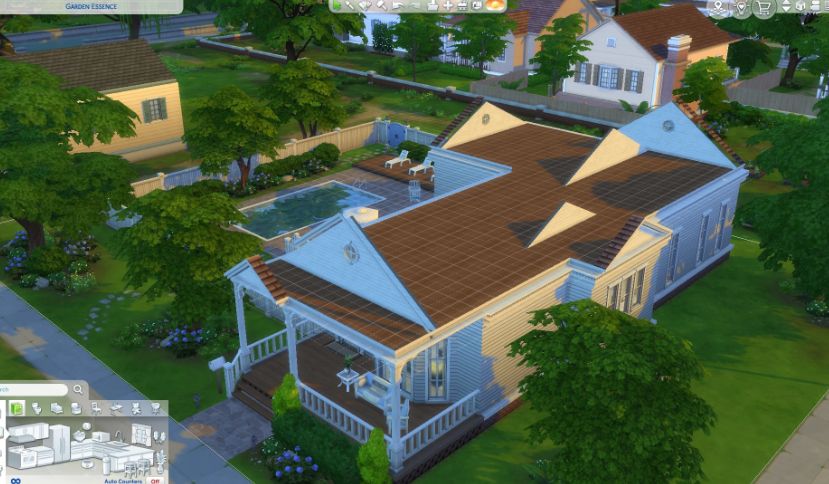
Image: SimsTree
This time, it’s roofs causing the trouble! Some players have noticed invisible roof sections popping up where they don’t belong. This bug occurs when a walled room is built inside a roof. So, if you’re trying to make an attic, beware. Until Electronic Arts fixes the bug, it could look pretty strange. Normally, the roof disappears only in a fully enclosed room, but with the latest update, roof sections vanish no matter what, leading to this frustrating invisible roof bug.
How Did It Happen?
The feature was originally designed to improve attic construction by concealing roofs within fully enclosed rooms. However, with the recent patch, the functionality has changed so that any room situated beneath a roof will now hide the corresponding roof section. And inclueds rooms completely enclosed by walls.
How To Work Around The Glitch?
To help EA release a hotfix, head to the EA forum where the bug was reported and cast your vote! While waiting for the fix, you can remove the roof section under the affected spot. Then replace it with the same flooring as before. If that leaves any areas without a floor, select a room beneath it, click on the yellow area, and choose ‘Build Ceiling’. Just make sure you’re on a higher floor than the room. Keep in mind, removing the floor in an open, unwalled space will also remove the ceiling, so there’s no way to rebuild it for overhanging roofs.
While EA works on a fix, builders can use the workaround above to keep their attics looking right. Stay tuned for updates, and don’t forget to vote on the bug report to help push a hotfix sooner.
Title Image Credit to Members in the Sims 4 Creative Builds FB Group
