
Recently, on October 2, 2026, Dissia released a mod here on TSR. This mod adds a CAS Position Slider. This Sims 4 CAS Position Slider lets users better control their Sims’ positioning. This gives the user more freedom and creativity when customizing Sims and taking photos. It allows players to move their Sims up or down in CAS, making it much easier to set up the perfect photo shoot.
What Does the CAS Position Slider Do?
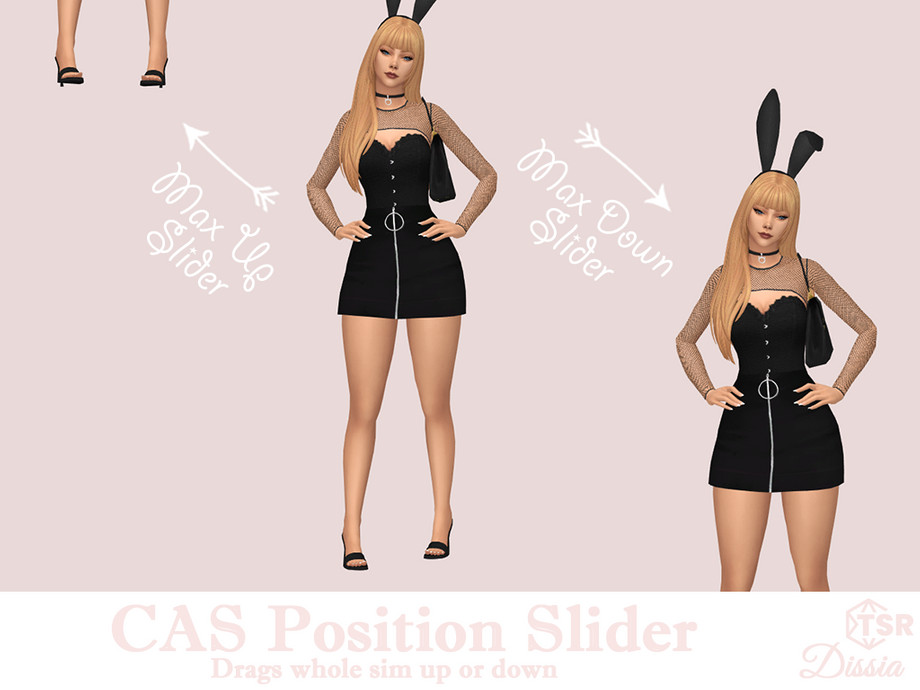
The CAS Position Slider is a very specific mod and comes in two parts: moving up and moving down. Each part lets users move their Sim up or down in Create a Sim (CAS) in The Sims 4. The sliders work in one direction- up or down- allowing users to reposition their Sim and easily return them to the default position.
To use the CAS Position Slider, click and drag the top or bottom of the Sim. This makes it easy to quickly adjust where your Sim appears on the screen without changing how you normally navigate or zoom around in CAS.
What Can the CAS Position Slider Be Used For
When Queenie first showed me that this mod was coming out, I was very excited! If you take photos of CC or outfits for your Sims… you probably know firsthand how hard it can be to photograph shoes. And don’t even get me started on hairstyles with high buns and ponytails! Getting everything to fit on the screen while still keeping enough detail can sometimes be a struggle.
Just like Dissia shows in her preview with head accessories, some items you simply cannot zoom out enough to photograph properly. This mod lets you move your Sim up or down. Then zoom in and out like you normally would in the base game. This gives you much more control over what actually appears on the screen. Then presto… picture perfect!
This could be especially helpful for anyone who regularly takes screenshots. Or Simmers who create CC, lookbooks, photograph outfits, or a Simmer who just wants better pictures of their Sims. Sometimes all you need is a little more room at the top or bottom of the screen! This slider gives you exactly that.
Where Can You Get the CAS Position Slider?
The CAS Position Slider has been uploaded to TSR, and you can get the mod right HERE. The mod includes both Up and Down Sliders, so if you want both options, download both. If you only need your Sims to move in one direction, you can download the slider you want.
Final Thoughts
I have already used this mod twice! Once for a shoe feature and another time for a very high bun hairstyle, which before would have been almost impossible to photograph without zooming all the way out. Being able to move my Sim up or down made getting the photos I needed so much easier.
I am really happy Dissia made this mod and shared it with us on TSR, as it’s definitely going to help me and speed up my workflow! If you regularly photograph your Sims or CC, this is one of those small mods that can make a surprisingly big difference.
